In short
For each recurring service contract, list the services and their units, then compare the units with what you deliver: devices in the RMM, seats in Microsoft 365, protected machines in backup. Change the units before the billing run, then check the invoice.
01What to compare
- Contract service units in Datto Autotask.
- Managed devices in Datto RMM or your RMM (Autotask + Datto RMM).
- Licences and backup from their own tools.
- The invoice in accounting (Autotask + QuickBooks Online).
02Common pitfalls
| Pitfall | Effect |
|---|---|
| Units updated after the billing run | A month billed at the old quantity |
| Service bundles | Devices counted in a bundle and again as a service |
| Retired devices | Client billed for machines that are gone |
Billing & Reconciliation in Revtein
Revtein lines up contracted, delivered and invoiced quantities for every client, service and period, and walks your team through each difference until the source shows it is…
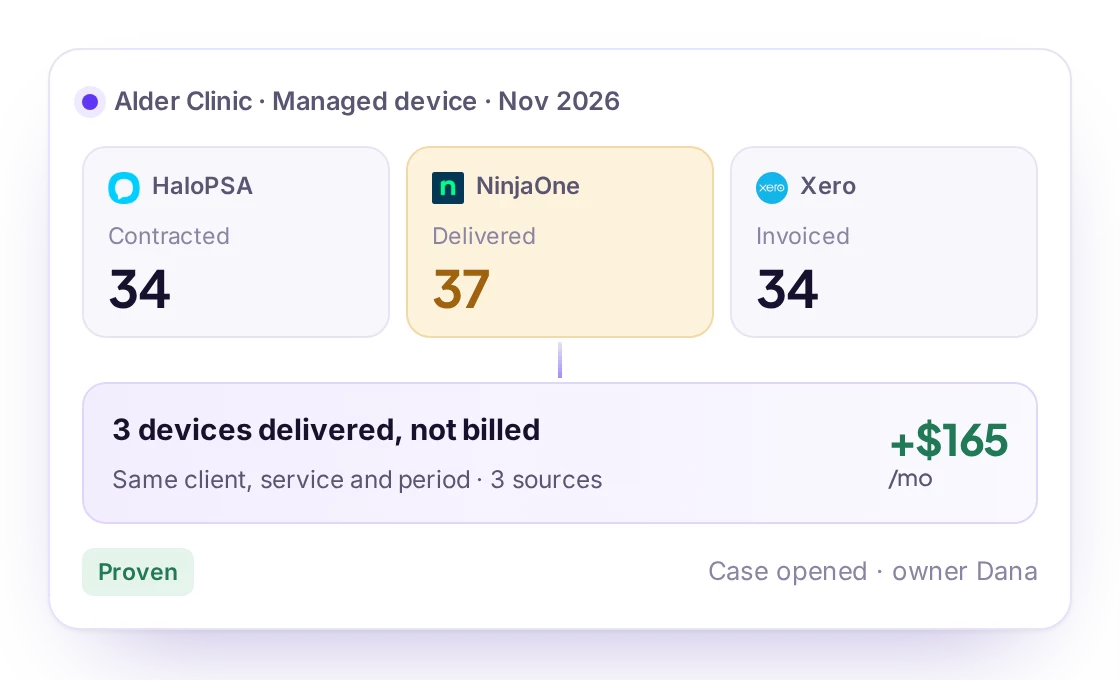
See how it worksEvidence · Alder Clinic, Managed device, Nov 2026
- Contracted34HaloPSAAgreement AG-2126 · recurring line 41081Nov 15, 9:20
- Delivered37NinjaOneApproved managed devices · org Alder ClinicNov 15, 9:18
- Invoiced34XeroINV-1042 · line Managed deviceNov 15, 9:21
Same client, service, unit and period$55 per device · agreement price
03How Revtein helps
Revtein reads Autotask, the RMM and accounting, opens a case per contract whose units differ from delivery, gives the exact values to set in Autotask and reads it again to confirm. See MSP billing reconciliation and the unbilled devices guide.
 HaloPSA
 ConnectWise PSA
 Datto Autotask
 Syncro
 Kaseya BMS
 Kaseya Vorex
 Pulseway PSA
 SuperOps PSA
 Freshservice