Export the managed devices per client from your RMM, the billed quantity per client from your PSA agreements, and the quantity on the last invoice. Wherever the RMM count is higher, you are delivering work you do not bill. Decide per client whether to bill the new devices or record why they are covered, then check the next invoice.
01Why devices go unbilled
- Onboarding happens in the RMM, billing in the PSA. A technician deploys an agent the same day; the agreement is updated weeks later, or never.
- Device types change. A workstation becomes a server, or a laptop is added to a per-user client who is billed per device.
- Retired devices are not removed either. The opposite gap also exists: clients billed for machines that are gone, which hurts trust at renewal.
02How to compare RMM and PSA, step by step
- Match the clients. The same client often has a different name in the RMM, the PSA and accounting. Build the mapping once.
- Count managed devices per client and type in the RMM (NinjaOne, Datto RMM, N-able N-central and others), excluding devices offline for longer than your contract allows.
- Read the billed quantity on each agreement or recurring invoice line in the PSA (HaloPSA, ConnectWise PSA, Autotask).
- Read the last invoice in accounting, so you know what the client actually paid.
- List the differences with the unit price, so each one has a monthly value.
| Client | Managed (RMM) | Billed (PSA) | Invoiced | Gap |
|---|---|---|---|---|
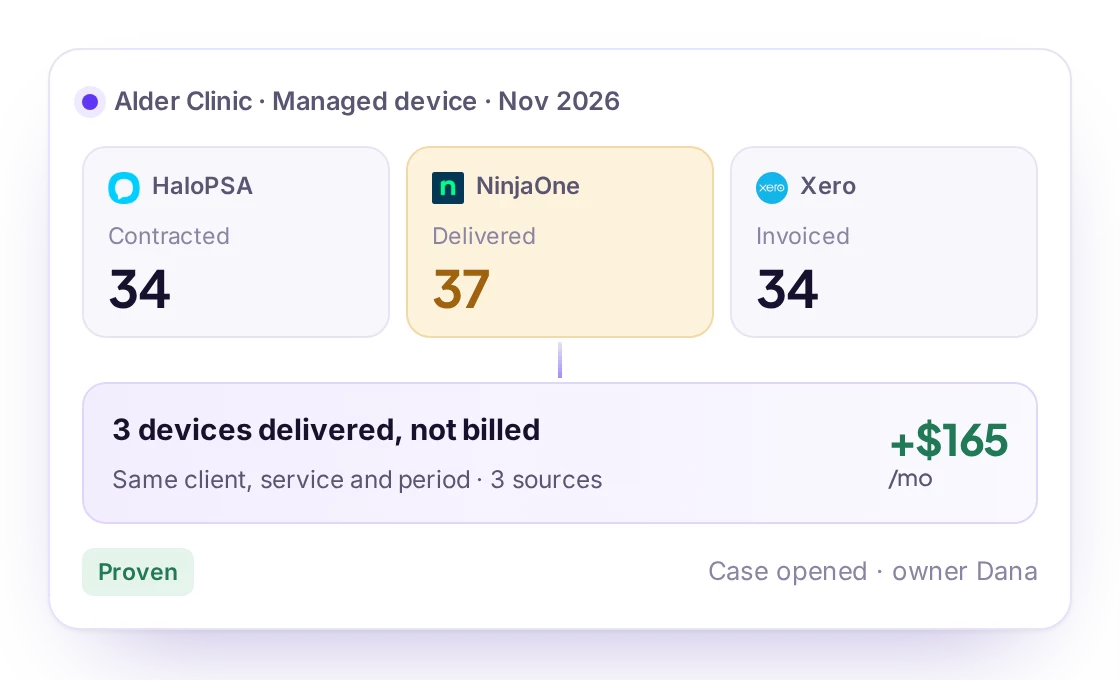
| Example client A | 37 | 34 | 34 | 3 devices not billed |
| Example client B | 12 | 14 | 14 | 2 devices billed, not managed |
Illustrative example.
Billing & Reconciliation in Revtein
Revtein lines up contracted, delivered and invoiced quantities for every client, service and period, and walks your team through each difference until the source shows it is…
See how it works HaloPSAContracted34
 NinjaOneDelivered37
 XeroInvoiced34
03Fixing the gap without upsetting the client
- Check the agreement first: some contracts include a number of devices, or bill per user.
- Bill new devices from the next cycle and tell the client what changed and why.
- Credit devices billed but no longer managed: it is the fastest way to build trust before a renewal.
- Re-check the next invoice: a fix is only done when the invoice shows it.
04How Revtein does it every month
Revtein reads your RMM, PSA and accounting, matches clients once, and opens a case for every difference with the numbers from each side. After approval it updates the recurring line in HaloPSA itself, or gives your team the exact values for other PSAs, then reads the source again to confirm. See MSP billing reconciliation and the HaloPSA + NinjaOne pairing, or start with the guide to revenue leakage.
 ConnectWise PSA
 Datto Autotask
 Syncro
 Kaseya BMS
 Kaseya Vorex
 Pulseway PSA
 SuperOps PSA
 Freshservice